EV charging software & products
Order charging cardMy account

Showcase · Inside Amplicity

Every charge.
Under control.

From the first connection to the final invoice. One clear workspace for the people running your charging network.

  • OCPP device management
  • OCPI roaming
  • English & German
Your network at a glanceamplicity
Your network at a glance
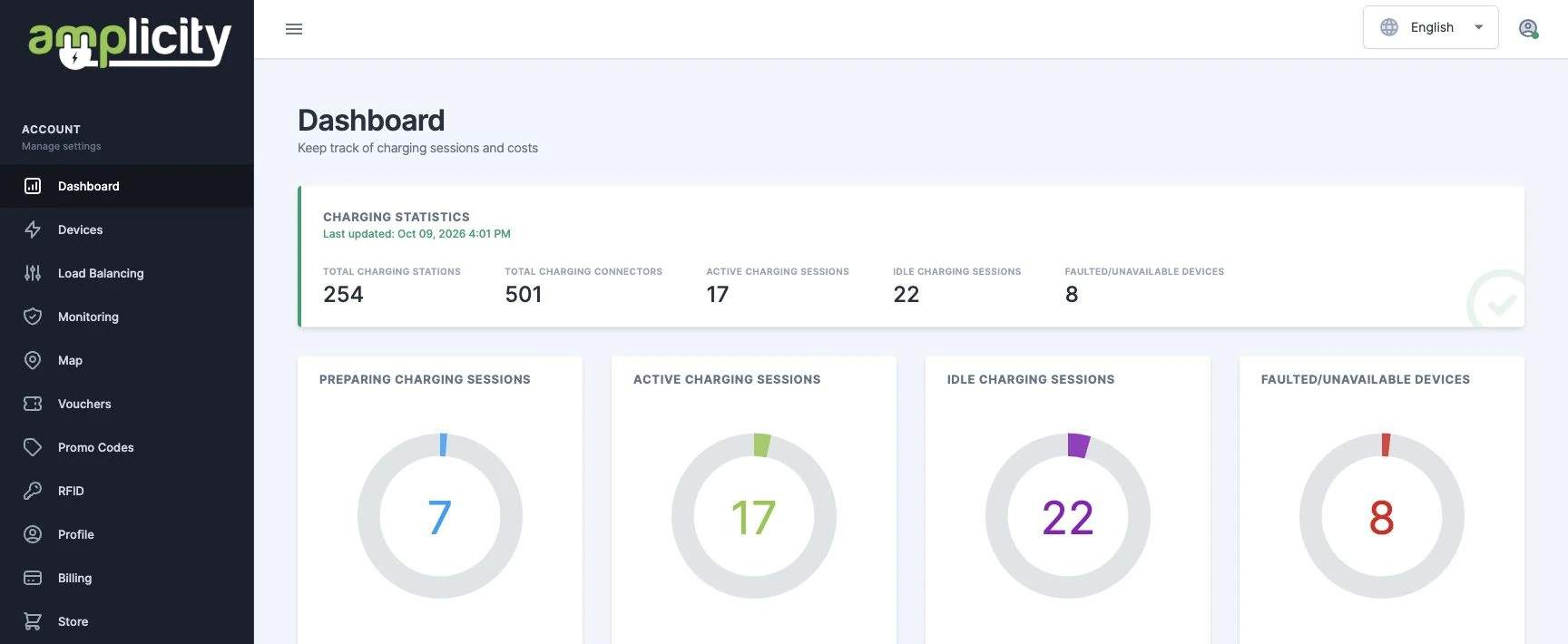
Actual Amplicity dashboard, captured 9 October 2026. A snapshot of the interface, not live website data.
Your network at a glance

↔ Swipe sideways to explore the full view.

Actual Amplicity dashboard, captured 9 October 2026. A snapshot of the interface, not live website data.

01 / The bigger picture

Less searching. More understanding.

See charging stations, connectors and session states together. Move from an overview of the network to the device that needs your attention, with charging history close at hand.

Network status

See station and connector totals in a single overview.
Session visibility

Follow preparing, active and idle charging sessions.

A clear next step

Find faulted or unavailable devices and open their details.

02 / Power, planned around your site

The right limits. At the right time.

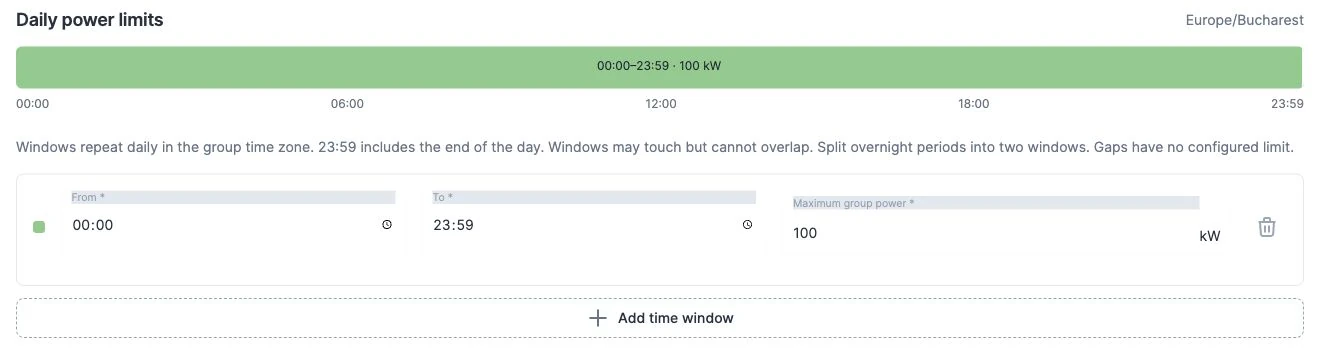
Group master devices and define a shared maximum power for recurring daily windows. Give each group its own time zone, then let the configured schedule govern the limits.

  • Group master devices under a common power limit
  • Set multiple daily windows with individual kW limits
  • Manage schedules in the group’s local time zone

Scheduled group limits are released outside the configured windows. Operation depends on compatible charging hardware.

Daily power schedulingAMPLICITY / 02
Daily power schedulingamplicity
Daily power scheduling
Actual load balancing editor, showing the default window before a group is saved.
Daily power scheduling

↔ Swipe sideways to explore the full view.

Actual load balancing editor, showing the default window before a group is saved.

  • Device groups
  • Daily schedules
  • Power limits

03 / Pricing with room to adapt

Different times. Different tariffs.

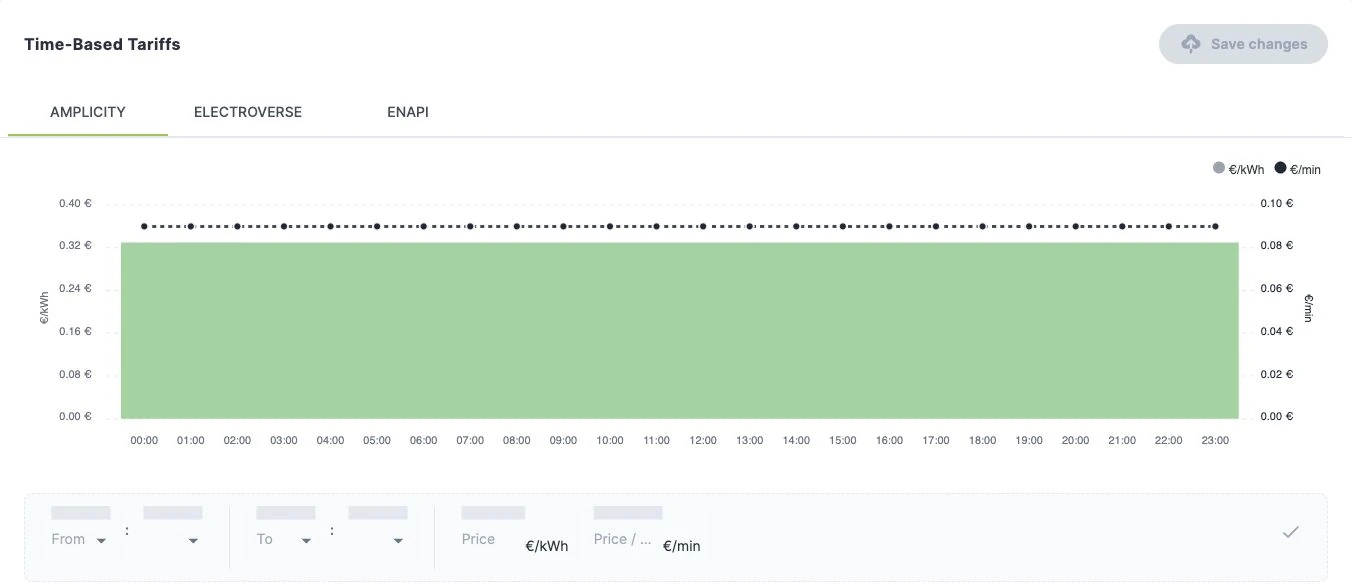
Build a tariff around how your stations are used. Define daily time windows, combine energy and time-based prices, and manage Amplicity, Electroverse and ENAPI pricing in dedicated tabs.

  • Energy prices in €/kWh and time prices in €/min
  • Time windows with a visual daily tariff chart
  • Separate tariff views for connected roaming partners

Roaming availability and the final driver price depend on the selected provider and agreement.

One view for every tariffAMPLICITY / 03
One view for every tariffamplicity
One view for every tariff
Actual tariff editor for Amplicity’s test device. Displayed values are illustrative configuration, not a public charging offer.
One view for every tariff

↔ Swipe sideways to explore the full view.

Actual tariff editor for Amplicity’s test device. Displayed values are illustrative configuration, not a public charging offer.

  • Time windows
  • Energy + time
  • Partner pricing

04 / Your hardware, in one workspace

From network view to device detail.

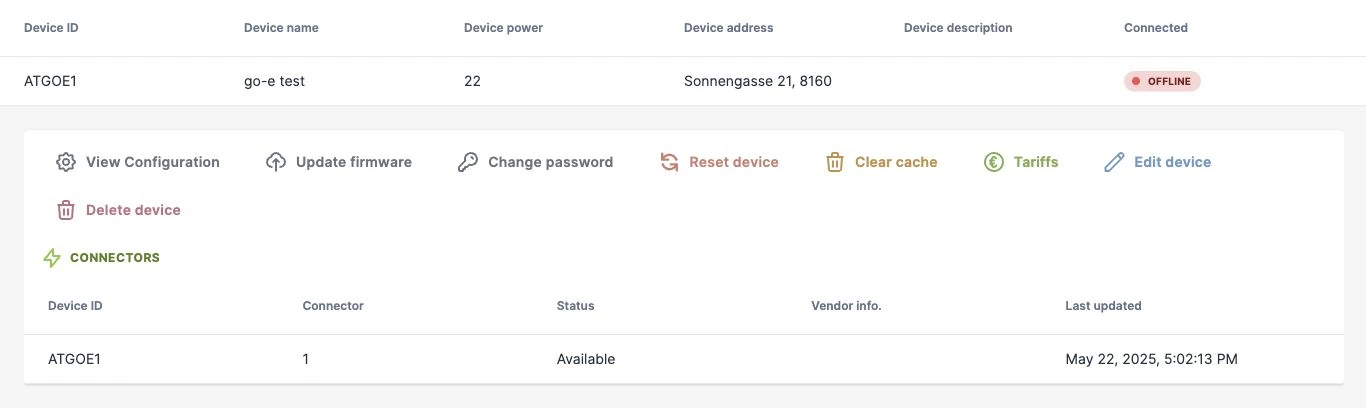
Search by device ID, filter online and offline stations, and inspect individual connectors. Configuration, tariff controls and maintenance actions stay close to the device they belong to.

  • Searchable devices and connector-level status
  • Configuration and supported firmware updates
  • Remote maintenance controls and bulk updates

Available commands depend on the device, connection status and your permissions.

A closer look at your devicesAMPLICITY / 04
A closer look at your devicesamplicity
A closer look at your devices
Actual device controls for Amplicity’s own test charger, shown offline with its last reported connector status.
A closer look at your devices

↔ Swipe sideways to explore the full view.

Actual device controls for Amplicity’s own test charger, shown offline with its last reported connector status.

  • OCPP
  • Connector status
  • Remote controls

05 / Beyond the charging session

The everyday details. Already connected.

Connection monitoring

Identify repeated connection drops, see current issues and review the past week’s history, including disconnect reasons.

RFID access

Manage charging cards and their allocations, giving drivers a familiar way to access your charging infrastructure.

Billing & history

Keep charging history, session costs, payment status and invoices together for a clearer view of charging activity.

Vouchers & promotions

Manage charging vouchers and promotional codes for the offers you want to make available to drivers.

Roaming built in

Connect charging operations with external mobility services through OCPI 2.2.1, including Electroverse and ENAPI.

Explore roaming

A familiar workspace

Work in English or German, with devices, charging activity and account tools organised in one application.

AMPLICITY · Simply connected

Your network. Let’s take a closer look.

See how Amplicity fits your locations, hardware and daily operations. We’ll walk you through the parts that matter to your team.

Arrange a demonstration